Printable bingo with pictograms
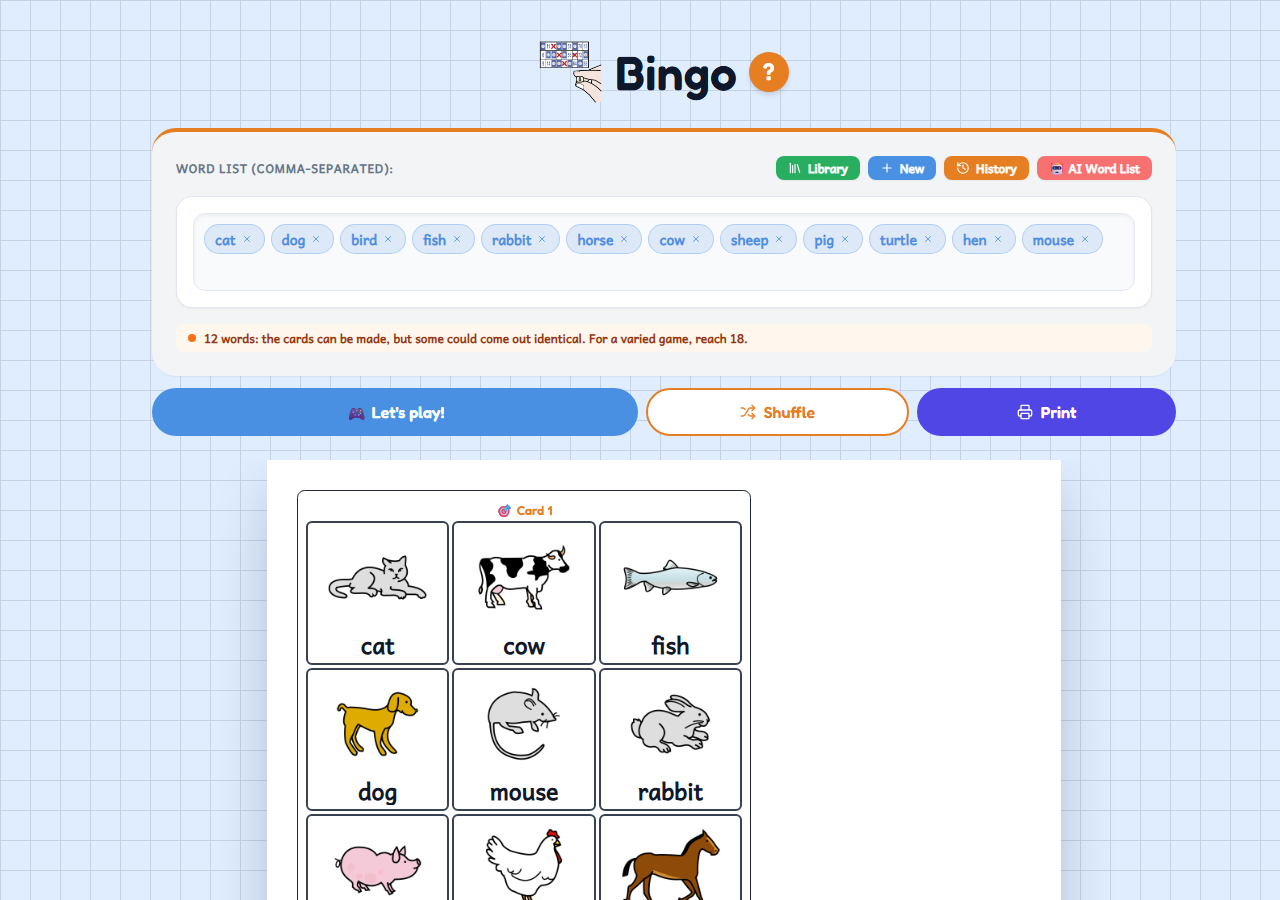
A bingo card generator with pictograms, words or numbers, free and with no sign-up. You type the list, the app makes a different card for each pupil, and you can print them or play from the screen.
Who it's for
For nursery, primary, special education and reception classes: any group that needs to practise vocabulary, numbers or letters through play. Pictograms mean pupils who can't read yet, or who are learning the classroom language, can follow the game too. There is nothing to draw or cut out: the pictograms appear by themselves from the words.
How to use it
- Type the list of words or numbers, or pick a topic from the Library (animals, food, clothes...). If you are signed in, you can also ask the AI for the list.
- Choose the rows and columns of the card, how many cards you want (up to 100), the paper and whether you want the pictogram, the text or both. The app makes a different card for every pupil.
- Print the cards and press “Let's play!”: the pictograms come up on the screen for you to call out while the pupils mark them.
Variations
- Vocabulary bingo: pictograms with the word underneath, or pictograms only for pupils who can't read yet.
- Number bingo, with classic cards of 5 numbers per row and the numbers in order.
- Text-only bingo, to practise words or letters with pupils who can already read.
- Cards with blank squares and the same pictograms in every row, so you can call a line. “Shuffle” gives you new cards for another game with the same words.