Pictogram translator for newly arrived pupils
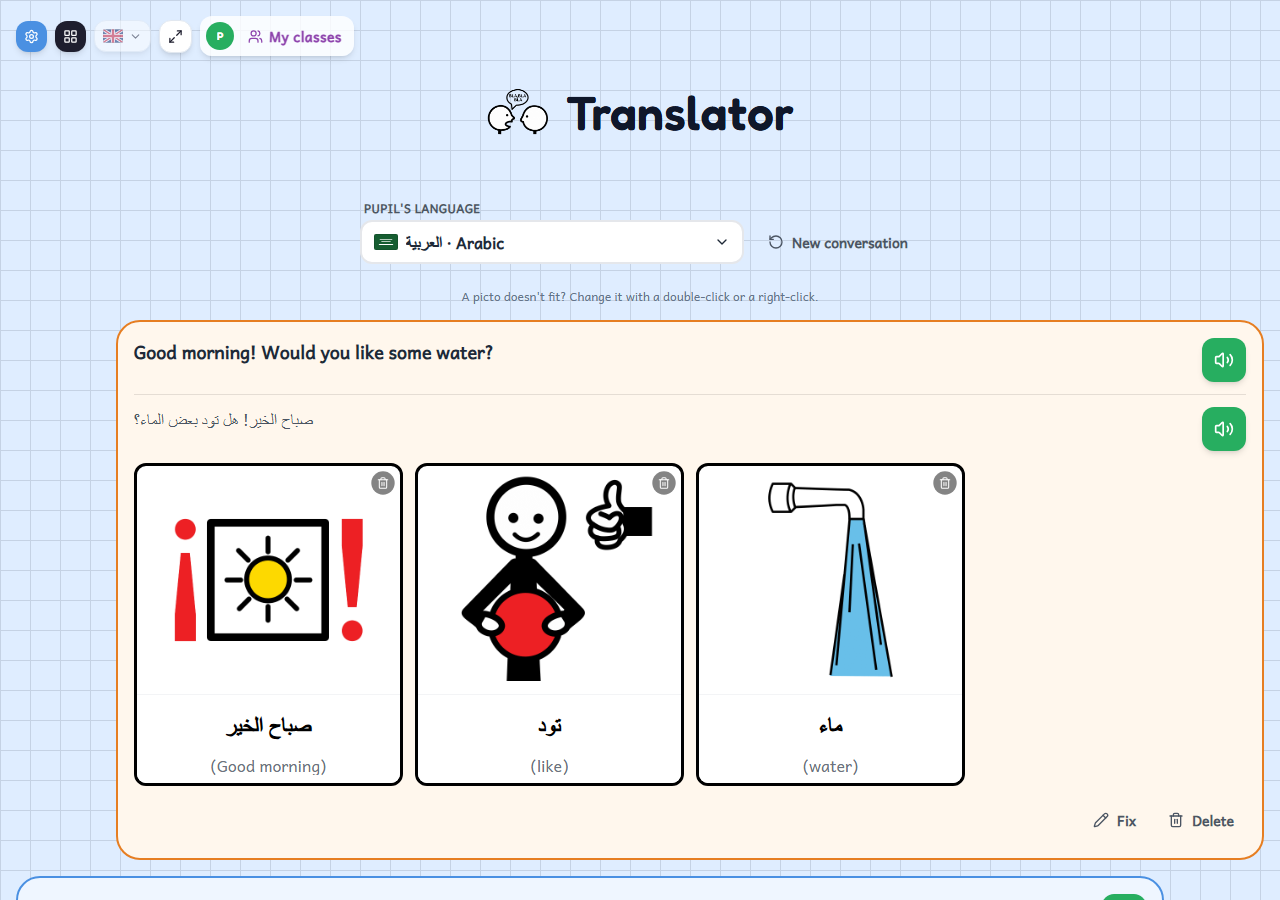
A conversation between a teacher and a pupil who do not share a language: you type or dictate a sentence, the app translates it and shows each word with its pictogram.
Who it's for
For reception classes and newly arrived pupils who do not yet speak the classroom language. It also works for talking with families who do not share your language, or as visual support for any pupil: the pictogram helps to understand a word even if the pupil cannot read yet.
How to use it
- Type or dictate a sentence, in your language or the pupil's; the app detects the language and asks you if it needs to.
- The app translates the sentence and puts a pictogram on every word. The pupil can answer the same way and the conversation goes back and forth, like a chat.
- Tap the speaker to hear the sentence and its translation read aloud, each in its own language.
Variations
- Choose the pupil's language from more than ten, such as Arabic, Chinese, Urdu, Romanian, Ukrainian or Russian.
- You can dictate with the microphone, if your browser allows it: blue is for the pupil and orange for the teacher.
- If a pictogram does not fit, you can change it with the search; you can also fix or remove a word, or fix or delete the whole sentence.
- The conversation is not saved anywhere: “New conversation” starts afresh. You need to be signed in to translate.